
The Realize Ads Campaign Group: How E-Commerce Brands Can Scale Intelligently Without Losing Control
- Werbung // Paid Partnership

- 3 days ago
- 16 min read
Scaling native ad campaigns for e-commerce often looks simple from the outside.
You have your creatives.
You have your audience data.
You have your budget.
What could possibly go wrong?
Test creatives. Optimize targeting. Increase budget. Repeat.
In practice, though, things can become messy very quickly. And in my experience, from working with dozens of e-commerce brands scaling native ads, this chaos rarely comes from poor creatives or the wrong audiences alone. It usually comes from a lack of structure inside the account.
That is the part almost nobody talks about until it becomes a real problem.
Six months later, you are suddenly managing fifteen campaigns with names like “SK-Test3-Desktop-Retarget-v2” or “Promo-Oct-Broad-Audience-Draft-Final-CURRENT.”
You no longer remember exactly what half of these campaigns were originally built for. Budget allocation turns into guesswork. Your reporting consists of campaign-level data, but no longer gives you real strategic insight. And when something is not working, you cannot immediately tell which campaign is causing the problem.

This is exactly where the Campaign Group system in Realize Ads comes in.
And I want to say this directly: if you understand this system, including the Budget Allocator logic and the What/How logic behind it, it can fundamentally change the way you scale native ads. It may also be one of the first visible signs of a broader development coming from Taboola.
Why account structure often becomes the biggest bottleneck when scaling
Let me describe a scenario I have seen many times in similar forms.
You are running native ads for an e-commerce brand in the premium skincare space. The target customer is female, between 25 and 45 years old, and has a certain level of purchasing power. You start with one campaign: broad audience, one creative angle. Performance is okay. Not outstanding, but okay. The CPA is around €32, and your target is €25.
So you start testing variations.
You create a second campaign with a different creative angle. Maybe you switch from “results-focused” to “ingredient-focused.” That campaign performs better.
CPA: €24.
You realize there may be something there.
Now you want to scale.
But you also want to keep testing.
So you create a third campaign that is focused only on mobile.
A fourth campaign tests a device split between mobile and desktop.
A fifth tests a different age group.
A sixth tests a more narrowly defined lookalike audience.
A seventh tests retargeting for users who visited your product pages but did not purchase.
Six months later, you are managing fifteen campaigns.
Some perform.
Some do not.
With some of them, you are not even sure whether they are still active.
The names are a disaster: “SK-Test3-Desktop-Retarget-v2,” “Skincare-PAUSED-Broad,” “Creative-NEW-Aug,” “Promo-Device-Split-Hypothesis-Testing.”
The institutional knowledge inside the account gets lost.
If you take one day off and someone else has to take over the account, that person is completely lost.
But the bigger problem is not just operational.
The real problem is that strategic decisions become slower and less clean. You can no longer see at a glance what is actually happening inside the account. You do not have a clear answer to the question: “Are we moving toward our target CPA for this product category, or are we drifting away from it?”
Instead, you have fifteen campaign-level data points that may tell you what you need to know. Or they may not.
This is where many e-commerce brands make mistakes.
They:
pause half of their campaigns because they are “not winning” on campaign level, even though they may be contributing to an acquisition strategy that works overall
over-optimize individual campaigns instead of taking a step back and checking whether the overall structure works
stop testing new angles because the account has become too difficult to manage, and as a result they miss changes in the market
The Realize Ads Campaign Group system is built for exactly this problem. It is not flashy. But it is far more useful than many people realize at first glance.
The core logic: What vs. How (Realize Ads Campaign Group)
Here is the mental model that made everything clearer for me when I first started working with Campaign Groups.
Every native ads account has two decision levels.
The first level is the strategic level.
What are we actually trying to achieve? What is the goal? What is the KPI?
For e-commerce brands, that usually means something like:
“Acquire new customers for our hero product at a target CPA of €25.”
Or:
“Retarget users who abandoned their cart at a target CPA of €18.”
Or:
“Test a seasonal offer with a budget limit of €5,000 over the next 30 days.”
The second level is the tactical level.
How do we want to achieve this goal? Which creative angles are we testing?
Which audience segments are we targeting?
Are we splitting by device?
By geography?
Which bidding strategy makes sense?
Which supply types should we prioritize?
The Campaign Group system makes this distinction explicit:
Campaign Group = the What, meaning your strategic goal
Campaigns inside the group = the How, meaning your tactical variations

All campaigns inside a Campaign Group should be optimized toward the same marketing goal and the same KPI.
Do not mix a conversion-focused campaign with a traffic-focused campaign in the same group. Do not place a campaign optimized for “Add to Cart” next to a campaign optimized for “Purchase.” When you mix goals, you break the logic of the system. Performance and reporting become messy.
Why?
Because the Campaign Group is the level where you measure success. If your campaigns optimize toward different goals, your group-level metrics lose their meaning.
Pro tip: Think of your Campaign Group like a small profit center inside your native ads account. It has a clear goal, a budget, and performance targets. Everything inside that group, meaning all the campaigns, represents different approaches to achieving exactly that one goal. This mental model changes how you structure accounts.
Practical e-commerce examples: how to structure Campaign Groups in practice
Theory is useful. But let’s get specific.
Here are four practical examples of how I would structure Campaign Groups for real e-commerce brands.
Example 1: One product, multiple creative angles
Scenario: You sell a premium supplement for €49. You have some early traction and now want to scale. At the same time, you have three creative hypotheses you want to test in parallel.
Hypothesis A: Testimonials and social proof work especially well with your audience. You show real customers talking about their experiences.
Hypothesis B: Product-first messaging works better. You focus on the unique ingredients, the science, and the formulation.
Hypothesis C: Problem-first messaging drives the most conversions. You start with the pain point and then position your product as the solution.
Instead of creating three separate campaigns without an overarching structure, you build a Campaign Group:
Campaign Group: Premium Supplement – Product A
Objective: Purchase Conversions
Target CPA: €20
Budget: €5,000 per month
Timeline: 30-day test period
Inside this group, you create three campaigns:
Campaign 1: Testimonial Angle
Audience: Broad + Lookalike
Bidding: CPA-optimized at €20
Creative: 3 testimonial-focused ads
Campaign 2: Ingredient-Focused Angle
Audience: Broad + Lookalike + interest-based, for example Health, Supplements, Fitness
Bidding: CPA-optimized at €20
Creative: 3 product- and ingredient-focused ads
Campaign 3: Problem-Solution Angle
Audience: Broad + Lookalike
Bidding: CPA-optimized at €20
Creative: 3 problem-first ads
Now you can see at a glance:
Is the overall supplement acquisition working?
Which creative angle performs best?
Should we increase the budget?
Which hypothesis was right?
The group-level data tells you whether the overall strategy is working. The campaign-level data tells you which tactical variation is strongest.
Example 2: Same product, device optimization strategy
Scenario: You have been running native ads for a fashion brand for three months.
You notice a pattern: mobile and desktop users behave very differently.
Mobile users have a higher CTR but a lower conversion rate. Desktop users have a lower CTR but a higher conversion rate. This suggests that you need different bidding approaches for the two devices.
Instead of simply creating two loose campaigns for “Mobile” and “Desktop,” you structure this as a device optimization strategy inside a Campaign Group:
Campaign Group: Fashion Product – Device Optimization Strategy
Objective: Purchase Conversions
Target CPA: €30, blended across devices
Budget: €8,000 per month
Campaign 1: Mobile-First Approach
Device Targeting: Mobile only
Bidding: CPA €28
Optimization: mobile-optimized creatives, thumb-friendly landing pages
Campaign 2: Desktop-Focused Approach
Device Targeting: Desktop only
Bidding: CPA €32
Optimization: desktop creatives, longer content possible
Now your reporting tells the actual story. You know exactly how much you are spending on mobile and desktop and what each area contributes. Your blended CPA hits your target. Both channels work. You do not have to guess whether the account is actually healthy.
Example 3: Acquisition vs. retargeting
Scenario: You are running a full-funnel strategy. You want to acquire new customers while also retargeting users who have already shown interest but have not purchased yet.
These are two completely different strategies. They have different KPIs, different audiences, and different budgets.
This is the classic case where you need two Campaign Groups, not one.
Campaign Group 1: New Customer Acquisition
Objective: Purchase from new users
Target CPA: €35, because acquisition is usually more expensive
Budget: €15,000 per month
Campaigns inside: Broad Audience, Lookalike, interest-based, geographic targeting
Campaign Group 2: Retargeting & Cart Recovery
Objective: Purchase from warm audiences
Target CPA: €18, because retargeting is usually cheaper
Budget: €5,000 per month
Campaigns inside: Cart abandoners, product page visitors, past buyers, engaged users
Why separate them?
Because your blended CPA becomes meaningless if you mix acquisition and retargeting. You will not know whether your acquisition strategy is working. You will not know whether your retargeting strategy is working either. You only see an average that does not tell you much.
Separating them gives you clarity.
New customer acquisition is more expensive, but it works. Retargeting is highly efficient. Those are data points you can act on.
Example 4: Seasonal campaign with a hard budget limit
Scenario: You are running a Black Friday or Cyber Monday campaign. You have a fixed budget of €20,000 for the week. You want to test three different discount angles to see what resonates best with your audience. After the week, the entire Campaign Group will be paused.
Campaign Group: BFCM 2026 – Limited-Time Offer Testing
Objective: Purchase Conversions
Target CPA: €15
Budget: €20,000 as a hard limit for the week
Duration: Nov. 28 to Dec. 2, 2026
Campaign 1: 30 Percent Off Messaging
Campaign 2: Free Shipping Messaging
Campaign 3: Urgency + Scarcity Messaging, for example limited stock
The Campaign Group structure keeps the whole thing organized and focused. You know exactly how much you spent. You know which discount angle performed best. And you have a clear comparison to your regular acquisition costs.
Pro tip: Use Campaign Groups for every coherent strategic goal. That could be a product, a customer segment, a geographic market, a seasonal campaign, a hypothesis test, a device strategy, or a funnel stage. The point is: every group has a clear goal. Everything inside it works toward that goal. Everything outside belongs to a different goal.
The Budget Allocator: how it works and what you need to know
Important note: The Budget Allocator is currently in closed beta and is not generally available yet. The following information is based on my learnings from the beta phase. Features, availability, and details may still change before general release.
One of the more practical features connected to Campaign Groups is the Budget Allocator. It is a tool that can save you a lot of time if you understand how it works.
The basic idea:
Instead of manually distributing budgets across five or ten individual campaigns, you set an overarching budget at Campaign Group level. The system then automatically distributes spend to where it makes the most sense.
For e-commerce teams running multiple creative tests in parallel, this significantly reduces operational effort. You do not have to check every day which campaign should receive more budget and which should receive less. The algorithm takes over part of that micro-optimization.
But here is a point I want to clearly call out because it is often misunderstood:
The current version of the Budget Allocator prioritizes scale and reach, not just pure performance metrics.

What does that mean in practice?
Let’s say you have a narrow, highly targeted campaign that converts extremely well. It has a CPA of €18, while your target is €20. At the same time, it can only meaningfully absorb €500 per day in spend.
Next to it, you have a broader campaign that is not quite as efficient. It has a CPA of €22 but can absorb €2,000 per day.
In that case, the algorithm may favor the broader campaign. Not because it is more efficient in isolation, but because it can absorb more budget and deliver more volume.
The system is designed to enable full budget utilization. It shifts spend to where the budget can actually be used.
Is that a mistake?
Not necessarily. It is a design decision.
The system optimizes for “volume + performance,” not just “performance alone.” For many e-commerce brands, that is actually the more useful approach.
Because at the end of the day, you want to scale. A campaign that performs excellently but can only absorb €500 per day will only take you so far if your goal is real growth.
But if you do not expect this behavior, the data can look confusing. You might think: “This campaign is winning, so why is it getting less budget?”
The answer is: it wins on CPA, but not necessarily on scalable volume.
Pro tip: If you want to use the Budget Allocator, set it up cleanly from the beginning. Same bidding strategy. Same conversion event. Same goal. Once that foundation is in place, the Allocator can take a lot of work off your plate. Without that foundation, you are often better off managing budgets manually or rethinking the structure again.
Why Campaign Group reporting changes your decision-making
What I find especially strong about the group format is the clarity it brings to reporting. And that may be even more important than the operational benefit.
When you evaluate campaigns individually, you ask a narrow tactical question:
Which variation looked best in isolation?
Campaign A had a CPA of €23. Campaign B had a CPA of €26. Campaign A wins.
Campaign B gets paused.
That is campaign-level thinking.
When you evaluate a Campaign Group, you ask a more strategic question:
Is this overall acquisition structure performing well enough to justify more investment?
Should we scale this group up or down?
For e-commerce brands with tight margins, that is almost always the more important question.
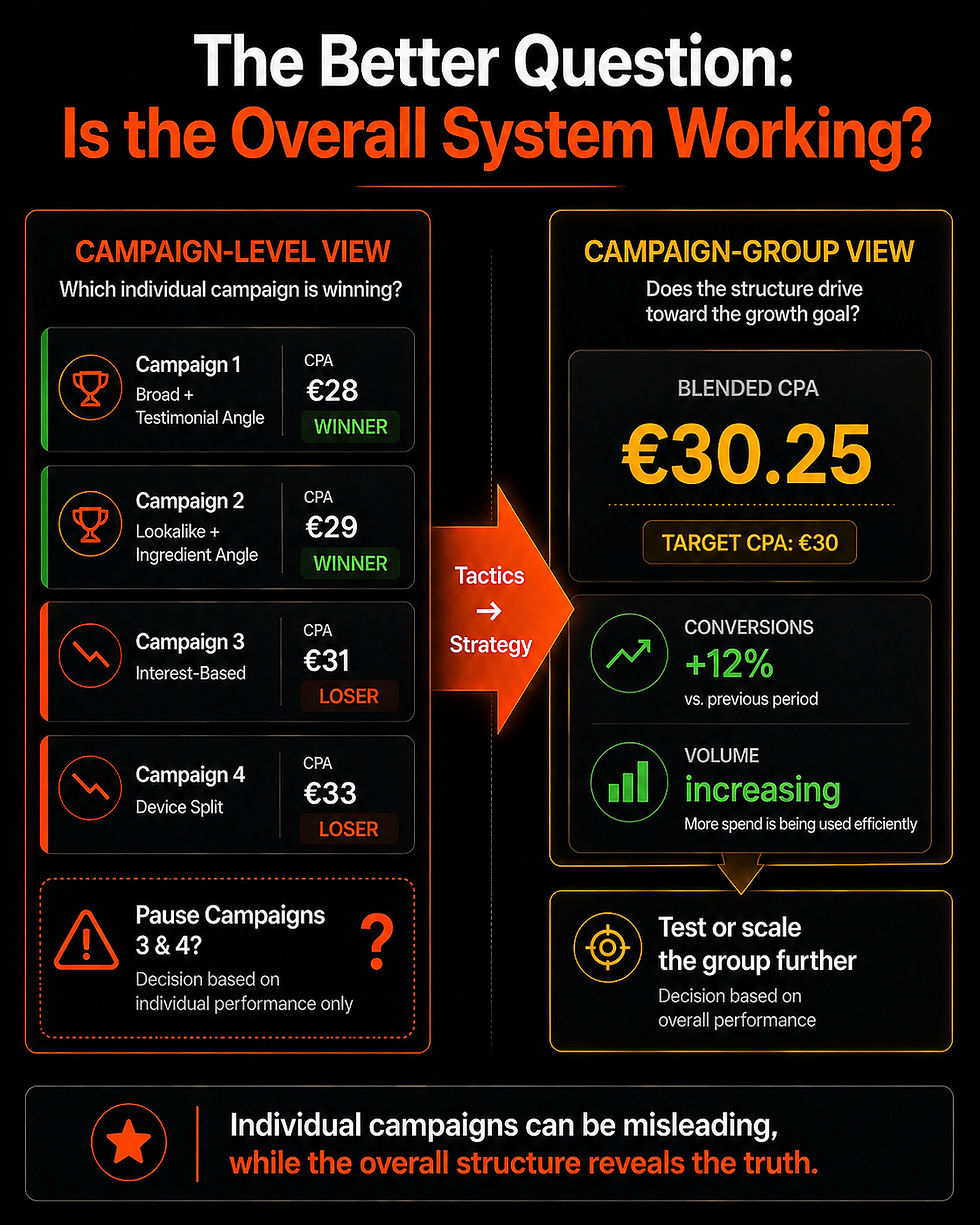
A concrete example:
You are running four campaigns inside a Campaign Group for new customer acquisition for a fashion brand. Your target CPA is €30.
Campaign-level view:
Campaign 1: €28 CPA, winning
Campaign 2: €29 CPA, winning
Campaign 3: €31 CPA, losing
Campaign 4: €33 CPA, losing
Based on that, you would pause Campaigns 3 and 4. You would end two experiments and continue only with the winners.
Campaign Group-level view:
The blended CPA across all four campaigns is €30.25. Conversion volume is increasing. Total conversions are up 12 percent this week. The overall acquisition structure is working.
And Campaigns 3 and 4 may be doing important work because they reach different audience segments that Campaigns 1 and 2 do not cover.
In the first scenario, you optimize for individual winners and kill experiments. In the second scenario, you recognize that the overall system is working and can scale it.
Which decision is better?
Usually the second one.
Individual campaigns can sit slightly above or below the target and still contribute to an overall strategy that works. Group-level reporting gives you exactly that context.
What Realize+ May Signal: More Structure for More Automation
Update: Since this section was originally written, Realize+ now has its own public landing page: realize.com/performance-agentic-advertising.

There, Realize+ is described as an agentic advertising system that builds on the existing capabilities of Realize. The focus is on performance-driven outcomes outside the walled gardens. Realize+ is currently still in beta.
To me, this is an interesting signal. Not because it allows us to predict every future feature, but because the direction is becoming clearer: Realize appears to be moving further toward automated, performance-driven campaign management.
In that context, Campaign Groups become especially relevant. They could be an early structural building block for that broader direction: a layer where goals, budgets, conversion events, and performance data are grouped more cleanly so that automation can work more effectively.
The basic idea is simple: the cleaner the account structure, the easier it becomes for a system to identify patterns. When multiple campaigns inside one Campaign Group optimize toward the same goal, use the same KPI logic, and generate comparable performance signals, the platform gets a much cleaner data foundation than it would from many loosely connected standalone campaigns.
That does not mean Campaign Groups are “Realize+,” or that Taboola has already revealed every next step in its automation roadmap. But they do fit well with a platform logic in which higher-level systems can make more decisions based on aggregated signals.
Compared with other platform developments, the direction broadly resembles approaches where advertising systems receive more operational freedom, while the advertiser controls the strategy through goals, budgets, assets, and business logic. The comparison is not one-to-one, but the underlying movement is similar:
less manual micromanagement, more structured inputs for automated optimization.
If that is the direction, Campaign Groups make a lot of sense as a foundation:
Aggregated signals at group level can give the system more context.
A shared goal and a shared conversion event across campaigns create more coherent data.
Campaigns optimizing toward the same goal generate cleaner feedback loops.
Historical group-level performance can become a stronger basis for recommendations and budget decisions.
That is why I would not look at Campaign Groups only as an organization feature.
They can also be a way to structure accounts so they are better aligned with a more automated Realize environment.
Put differently: if you learn how to structure Campaign Groups properly today, you are not just bringing more order into your current account. You may also be building a foundation that better fits what Realize+ and future automation layers could require.
The practical workflow: how to build Campaign Groups for your account
The theory matters. But how do you actually implement it?
Here is the practical workflow I would follow when building a new e-commerce account from scratch with Campaign Groups.
Step 1: Start with a question before you open the platform
Do not start by asking:
“Which creatives should I test?”
And not:
“Which audiences should I reach?”
Instead, ask:
What are the different commercial goals in this account right now?
Write them down. Be specific. Do not stay vague.
For an e-commerce brand, these goals could be:
Acquire new customers for our hero product at a target CPA of €25
Retarget users who visited our product pages but did not purchase at a target CPA of €18
Test a new product line with a budget limit of €10,000 for this month
Win back cart abandoners at a target CPA of €12
Scale a BFCM campaign at a target CPA of €15
Each of these goals becomes its own Campaign Group.
Step 2: Define the What for each Campaign Group
For every Campaign Group, you should answer:
Which product or customer segment does this group relate to?
What is the conversion objective? Purchase, Add to Cart, or something else?
What is the target CPA or target ROAS?
What is the total monthly budget?
What is the timeline? Ongoing or time-limited?
Step 3: Design the How inside each Campaign Group
What are three to five different tactical approaches to achieving this goal?
For new customer acquisition, for example, that could be:
Campaign 1: Broad Audience, testimonial-focused creative, CPA Bidding
Campaign 2: Lookalike Audience, product-focused creative, CPA Bidding
Campaign 3: Interest-based Audience, for example Health, Wellness, or Fitness, with problem-solution creative and CPA Bidding
Step 4: Set up the campaigns with consistent parameters
Pay attention to:
same bidding strategy across all campaigns in the group
same conversion event across all campaigns
similar targeting scope, meaning do not mix extremely broad and extremely narrow targeting inside the same group
Step 5: Let the groups run for at least two to four weeks
You need enough data to identify real trends. Making decisions too early often leads to killing structures that could have worked before they had enough time to learn.
Step 6: Evaluate at group level first
Start by asking:
Is the blended CPA within the target range?
Are conversions increasing?
Is the overall structure working?
If yes, scale the group. Increase the budget. It is completely fine if one campaign is slightly above the target and another is slightly below it. What matters is whether the overall system works.
If not, go deeper into the campaign-level data. Is one campaign dragging down the whole group?
Does the group need more time?
Or should you rebuild the entire structure?
Once you start thinking about your account this way, goals first and tactics second, many things become clearer. The account structure reflects your business logic, not just your test history.
Management becomes easier.
Decisions become faster.
Scaling becomes more intentional.
The honest assessment: what Campaign Groups do not solve
Before I wrap this up, I want to be clear about what Campaign Groups do not do. Transparency matters here.
Campaign Groups do not save bad creatives. If your ad copy is weak or your images do not stand out, structure alone will not save you. Good structure only makes it easier to identify bad creatives faster.
Campaign Groups also do not save a product with weak market fit. If your product does not solve a real problem for your audience, or if your pricing is clearly out of line with the market, a better campaign structure will not fix that. You need a better offer.
Campaign Groups also do not turn a weak account around overnight. If you have spent six months running poorly optimized campaigns, a better structure may help in the short term. But the real gains still come from creative testing, audience refinement, and continuous optimization.
Campaign Groups also do not replace good judgment. The system still needs human decisions. Looking at your group-level CPA and saying “this is working, let’s scale it” requires you to know your margins, understand your LTV, assess your competitive environment, and have clear growth goals.
Structure makes good decisions easier. But it does not automatically prevent bad ones.
The real takeaway: structure enables scale
What Campaign Groups can do:
They make a growing account easier to control.
Less decision noise.
learer budget logic.
Reporting that aligns with business goals instead of just campaign-level variables. Faster decisions. Easier handovers to team members. A better ability to understand what works and what does not.
For e-commerce brands that want to scale beyond the early testing phase, this structural clarity becomes extremely important.
It is the difference between:
“We are running a lot of campaigns and guessing which ones work.”
and:
“We have a clear portfolio of strategic initiatives, each with a goal, a budget, and a measurement framework.”
And if my assessment of where Realize is heading is correct, then becoming familiar with Campaign Groups now may be more valuable in the short term than it looks at first glance.
You are then building your account in a way that not only makes sense today, but is also likely to fit better with whatever the next automation layer becomes.
Interested in native ads for your e-commerce business?
If you run an e-commerce brand and want to understand whether native ads could make sense for you, whether for new customer acquisition, retargeting, seasonal campaigns, or product launches, you can submit an inquiry here directly.
Note: The following link is a referral link to Taboola. If a collaboration results from this link, I may receive a commission.
In the conversation, the Taboola team can discuss how native ads could be used for your specific use case, which CPA and volume assumptions may be realistic in your market, and whether the channel could make sense for your business.
Disclosure
This article was created as part of a paid partnership with Taboola. I was compensated for this content.
The views, assessments, and practical recommendations expressed here are my own. They are based on my personal experience in performance marketing and my work with native ad campaigns for e-commerce brands.
I am a former Taboola employee and disclose this in the interest of full transparency.
The link above is a referral link. I may receive a commission if it leads to a collaboration.
Nothing in this article constitutes a guarantee of results. Performance in native advertising depends on many factors, including product quality, pricing, messaging, audience, creative execution, and market conditions. Results can vary significantly depending on the account and brand.